
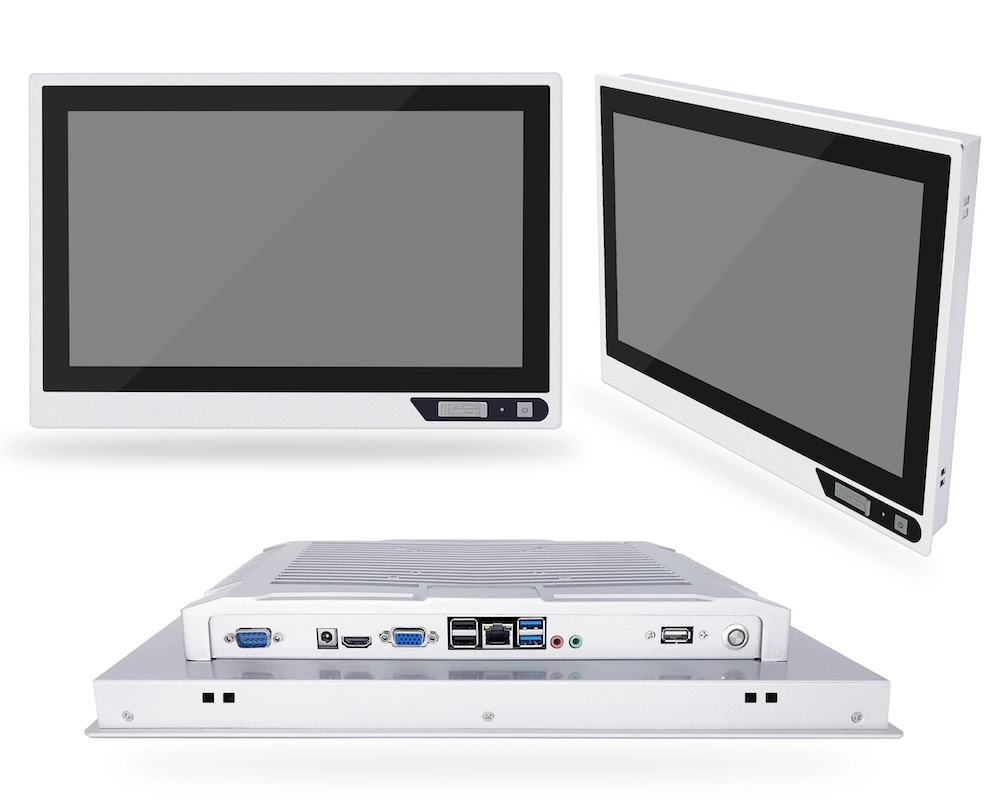
Industrial panel PCs combine a touchscreen and computer in one unit. They are commonly installed in factory terminals, control cabinets, production machines, industrial kiosks and other OEM equipment.
Selecting a suitable panel PC requires more than comparing screen size and processor performance. Mechanical fit, I/O layout, power input, mounting method, operating environment, operating system and hardware availability should be reviewed before sample production.
Application software, control programs and third-party licenses are provided by the customer or system integrator.
Industrial Panel PC Hardware Checklist
This checklist helps equipment manufacturers, system integrators and procurement teams review industrial panel PC requirements before sample evaluation and production. For an initial inquiry, share the requirements already known; remaining details can be clarified during configuration review.
Confirm the Display Size and Installation Space
Common industrial panel PC sizes include 10.4″, 12.1″, 15″, 15.6″, 17″, 18.5″, 19″ and 21.5″. Available sizes and resolutions depend on the selected LCD panel and project requirements.
Before finalizing the enclosure and mounting design, review:
- Required display size
- Equipment opening dimensions
- Available installation depth
- Landscape or portrait orientation
- Viewing distance
- Mounting-hole position
- Cable-access direction
Mechanical drawings or installation-space information, when available, help confirm front-panel dimensions, mounting arrangements and rear clearance before sample production.
Confirm Resolution, Brightness and Viewing Requirements
Resolution determines how much information can be displayed, while brightness affects visibility in the operating environment.
Standard-brightness displays are generally suitable for indoor industrial equipment. Higher brightness may be needed in bright workshops, near windows or in selected semi-outdoor applications. Suitability also depends on the complete equipment design and operating environment.
Review the following requirements:
- Display resolution and brightness
- Viewing angles and viewing distance
- Landscape or portrait orientation
- LCD panel format
- Anti-glare requirements
- Cover-glass surface treatment
- Expected product-supply period
Final display availability should be confirmed for the required size, resolution, brightness and project quantity.
Select the Touch Technology
Projected capacitive touch, or PCAP, supports multi-touch operation and is commonly used for operator panels, kiosks and industrial equipment with flat front-glass designs.
Resistive touch may be evaluated for selected projects requiring stylus operation, single-point input or specific glove-use conditions. Glove operation should be checked using the actual gloves and selected touch configuration.
Review:
- PCAP or resistive touch
- Required number of touch points
- Glove or stylus operation
- USB or optional RS232 touch interface
- Cover-glass thickness
- Surface-hardness requirements
- AG, AR or AF treatment requirements
- Operating-system compatibility
The customer’s operating system and application software must support the selected touch controller and interface.
Define the Processor, RAM and Storage
Select the computing configuration according to the operating system and application workload.
Basic equipment terminals may use an entry-level processor. Machine-vision interfaces, data-processing applications or applications displaying multiple real-time windows may require higher performance.
Depending on the selected platform, hardware options may include:
- Intel N-series or J-series processors
- Intel Core i3, i5 or i7 processors
- 4GB, 8GB or 16GB RAM
- 128GB, 256GB or 512GB SSD
Before approving the configuration, review processor architecture, CPU performance, memory, storage capacity, operating-system version and future expansion needs.
BaseIPC can review available hardware configurations. The customer’s software team or system integrator should confirm that the selected configuration meets the application requirements.
Prepare an I/O Port List
Industrial equipment may require several interfaces for controllers, peripherals and network connections.
Hardware interface options may include:
- LAN and USB
- COM ports with RS232 or RS485 configurations
- HDMI, VGA or DisplayPort
- Audio input and output
- GPIO
- Optional Wi-Fi or cellular modules
Availability and interface combinations depend on the selected hardware platform.
For I/O configuration review, provide the following details where known:
- Interface types and quantities
- Connector positions
- Cable-access direction
- Communication-hardware requirements
- Wireless-module requirements
- Installation clearance around connectors
BaseIPC can review physical interfaces, connector positions, cable layout and hardware I/O configuration. Communication software, protocol development and machine-control programming are provided by the customer or system integrator.
Confirm the Mounting Method
Installation options may include:
- Panel mounting
- Embedded installation
- VESA mounting
- Cabinet installation
- Project-specific mounting brackets
Available mounting arrangements depend on the selected enclosure. Mechanical compatibility should be verified before sample production.
Useful installation information includes:
- Panel cut-out dimensions
- Front-panel dimensions
- Mounting-hole positions
- Available installation depth
- Rear clearance
- Cable-access direction
- Cabinet or equipment drawings
For customized projects, enclosure structure, mounting brackets, connector positions, surface finish and logo branding can be evaluated.
Confirm the final mechanical drawing before production, as differences in cut-out size, mounting-hole position or enclosure depth can affect installation.
Confirm Power Input and Thermal Conditions
Power input must match the equipment’s electrical design. Depending on the selected platform, options may include 12V, 24V or wide-voltage DC input. Availability should be confirmed for the selected motherboard and configuration.
Review:
- Input voltage and power connector
- Grounding requirements
- Ambient operating temperature
- Expected operating hours
- Installation inside or outside a cabinet
- Available ventilation space
- Dust and moisture exposure
- Heat generated by nearby equipment
Selected configurations may support passive fanless cooling. Other configurations may require active cooling or a different thermal structure.
The cooling method should be evaluated against processor workload, enclosure design, installation space, ambient temperature and operating hours.
Confirm Front-Panel Protection Requirements
An IP65 front-panel option may be evaluated for applications exposed to dust or splashes. Applicable protection depends on the selected configuration and correct installation.
Review:
- Front-panel structure
- Gasket design
- Equipment opening
- Mounting arrangement and pressure
- Cable entry
- Rear enclosure
- Overall cabinet structure
Front-panel protection does not establish protection for the complete panel PC or equipment from every direction.
Projects requiring IP66, IP67, a specific NEMA rating or outdoor operation need a separate review of the installation, environment and required protection standard. Availability must be confirmed for the project.
Verify Operating System and Software Compatibility
Optional Windows or supported Linux pre-installation may be evaluated according to the selected hardware platform.
Application software and integration remain the responsibility of the customer or system integrator, including:
- HMI application development
- PLC programming
- SCADA configuration
- Machine-control software and control logic
- Communication protocol development
- Third-party runtime licenses
- Customer-specific applications
Before sample approval, test the actual application with the selected:
- Processor architecture and operating-system version
- Display resolution
- Touch controller and interface
- LAN and COM ports
- External controllers and peripherals
Hardware compatibility should be evaluated together with the customer’s application software during sample validation.
Validate a Sample Before Batch Production
Sample evaluation helps identify integration issues before a regular OEM order.
Check:
- Mechanical fit and mounting
- Display quality, brightness and viewing angles
- Touch performance
- I/O and peripheral compatibility
- Power input
- Operating-system and application compatibility
- Cable layout and connector access
- Thermal performance
- Continuous operation under the intended workload
After sample approval, a pilot run may be used to review assembly consistency, component configuration, packaging and equipment integration before batch production.
Confirm any mechanical, electrical or configuration changes identified during testing before production begins.
Information for Configuration Review and Quotation
Start with your preferred panel PC model or screen size and explain how it will be used. Include specifications and estimated quantities already known.
The following information can guide configuration review. Remaining details can be clarified during discussion, with the quoted configuration confirmed in the quotation.
- Preferred model or screen size
- Resolution and brightness
- Touch requirements
- CPU, RAM and SSD requirements
- I/O ports
- Power input
- Mounting method
- Operating environment
- Operating system
- Front-panel protection requirements
- Sample quantity
- Estimated order quantity
- Destination country
- Mechanical drawings or equipment-opening dimensions, if available
BaseIPC Industrial Panel PC Hardware Support
BaseIPC supports industrial panel PC hardware configuration and customization for OEM equipment projects.
Hardware support may include:
- Display and touch configuration
- CPU, RAM and SSD selection
- Physical I/O layout review
- Metal enclosure fabrication
- Front-panel customization
- Mounting-structure customization
- Cable-layout adjustment
- Hardware assembly
- Aging tests and thermal checks
- Sample evaluation
- Pilot runs
- Small-to-medium batch OEM production
Configuration availability and customization are subject to engineering evaluation and final specification or drawing confirmation.
Manufacturing Base: Guangzhou, China
Business Inquiry: [email protected]
Phone: +86 13702548692
From Configuration Review to Sample Evaluation
Select an industrial panel PC according to the complete equipment design. Display, computing performance, interfaces, power, mounting, operating environment and software compatibility all affect the final configuration.
An initial inquiry can begin with the requirements already available. Detailed specifications and mechanical compatibility should then be confirmed during configuration review and sample evaluation before production.
Request Industrial Panel PC Hardware for an OEM Equipment Project
Tell us your preferred panel PC model or screen size and how it will be used. Include key specifications, sample requirements or estimated order quantity if available. BaseIPC can review your requirements and recommend a suitable hardware configuration for quotation.